Main Menu
collapse

Resources

Stud of Creighton Game

No Stud when we lose.
2025-26 Season SoG Tally
Ross4
James Jr1

'24-25 * '23-24 * '22-23
'21-22 * '20-21 * '19-20
'18-19 * '17-18 * '16-17
'15-16 * '14-15 * '13-14
'12-13 * '11-12 * '10-11

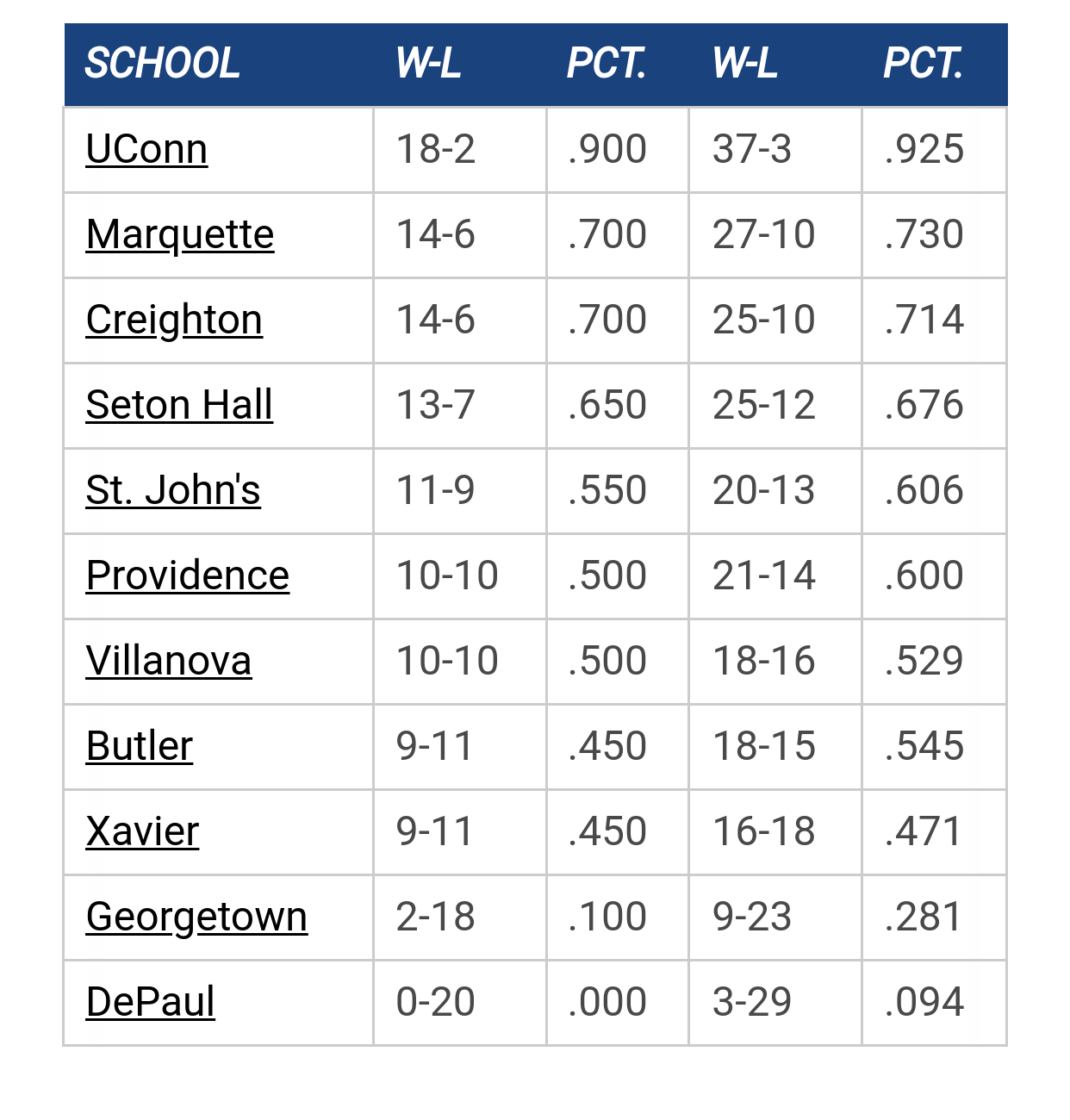
Big East Standings

Recent Posts

Please Register - It's FREE!

The absolute only thing required for this FREE registration is a valid e-mail address. We keep all your information confidential and will NEVER give or sell it to anyone else.
Login to get rid of this box (and ads) , or signup NOW!

Next up: Seton Hall

Marquette
63
Marquette vs
Seton Hall
Date/Time: Dec 30, 2025, 6:00pm
TV: FS1
Schedule for 2025-26
Creighton
84

77ncaachamps

How does one add a caption to an image?

(Edit: Other questions...can you make an image smaller on the Wiki? Or do you have to edit the image on your computer first?)

Need to do some for the Tony Smith page! (Check it out - when you can!)

Thanks!  ;D
SS Marquette

mu_hilltopper

To have the wiki resize the image, put a "?HeightxWidth" at the end of the filename.

Example:
{{the_marquette_ticket_project:1993_ncaa.jpg?200x400}}

A caption is appended to the end with a pipe, although it may not be what you expect, as IIRC, it shows up as a tool tip, not a caption.

{{the_marquette_ticket_project:1993_ncaa.jpg?200x400|This is the caption}}

And for the heck of it, left and right justify can be done by putting a space before or after the whole thing.

Right align:
{{ the_marquette_ticket_project:1993_ncaa.jpg?200x400}}
   ^ notice the space

Left align:

{{the_marquette_ticket_project:1993_ncaa.jpg?200x400 }}

rocky_warrior

You can also cheat on the height and width - if you only give the height, then the wiki will magically resize the image to have the right scaled width, like:

{{the_marquette_ticket_project:1993_ncaa.jpg?200}}

77ncaachamps

Thanks guys!!! Having fun with it!!!
SS Marquette

Previous topic - Next topic