Main Menu
collapse

Resources

25-26 SOTG Tally

2025-26 Season SoG Tally
Ross6
James Jr4
Parham1
Stevens1

'24-25 * '23-24 * '22-23
'21-22 * '20-21 * '19-20
'18-19 * '17-18 * '16-17
'15-16 * '14-15 * '13-14
'12-13 * '11-12 * '10-11

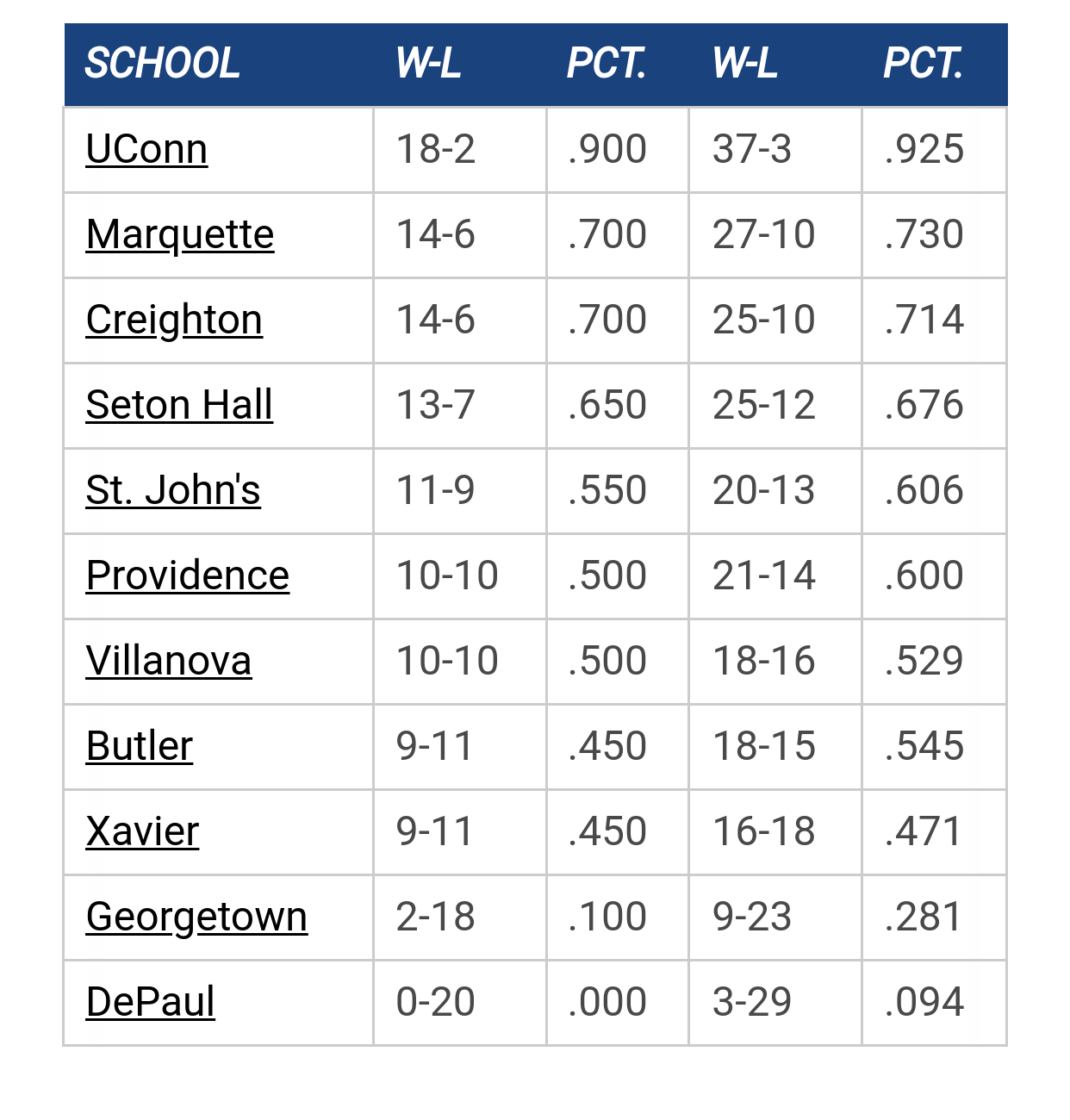
Big East Standings

Recent Posts

Summer workouts by MuMark
[Today at 10:35:50 AM]


Shaka interview with Rothstein by Vander Blue Man Group
[Today at 10:30:28 AM]


Best College Player You've Seen vs MU? by Pakuni
[Today at 10:25:57 AM]


Open practice by JakeBarnes
[Today at 10:00:11 AM]


What future non-cons would you like to see? by Scoop Snoop
[Today at 09:30:18 AM]


Recruiting as of 6/15/26 by JakeBarnes
[Today at 09:01:04 AM]


NM by Hards Alumni
[Today at 06:41:12 AM]

Please Register - It's FREE!

The absolute only thing required for this FREE registration is a valid e-mail address. We keep all your information confidential and will NEVER give or sell it to anyone else.
Login to get rid of this box (and ads) , or signup NOW!

Next up:  NA

Marquette
87
Marquette
Scrimmage
Date/Time: Oct 2026
TV: NA
Schedule for 2025-26
Xavier
89

Marquette65

for those techies or SCOOP  system administrates out there.

I have MUSCOOP set up as a favorite on my Internet site.  since the server problems, the old MUscoop site says"MU maitenance mode"

Any idea how I get get it to register MU SCOOP as b/4 

Thanks

ZiggysFryBoy

no techie, but I'd clear the bookmark and redo it again.

spiral97

yeah make sure you have the url set to muscoop.com not to an ip address (don't use the dotted number notation).

if it's still an issue then post the url that you have the bookmark set to.
Once a warrior always a warrior.. even if the feathers must now come with a beak.

Daniel

Since the move to the new server, I can no longer use the "back" button in internet explorer - it's greyed out, and I have to click Hangin' at hte Al each time to return to home.  Any ideas?

bs4173

Quote from: Daniel on January 08, 2010, 10:42:01 PM
Since the move to the new server, I can no longer use the "back" button in internet explorer - it's greyed out, and I have to click Hangin' at hte Al each time to return to home.  Any ideas?


Stop using Internet Explorer.  ;)

Actually, it could be a bug. IE8's been having issues with navigation buttons...maybe you need to install an update. Otherwise, it could definitely be the bookmark issue that spiral mentions. I had to do the same thing after the upgrade because I was having trouble with the site when clicking my bookmark to access it.

spiral97

Quote from: Daniel on January 08, 2010, 10:42:01 PM
Since the move to the new server, I can no longer use the "back" button in internet explorer - it's greyed out, and I have to click Hangin' at hte Al each time to return to home.  Any ideas?


very odd... works for me.. which IE version?  also can you give me the URL of "home"?
Once a warrior always a warrior.. even if the feathers must now come with a beak.

Daniel

Thanks, spiral.  I did re-bookmark it before, but still can;t use the back button.  I'm using IE 8.... works everywhere else I've been tho, so thie is weird.  And used to work here.  Thanks for helping..... appreciate it.

rocky_warrior

#7
Just as a general tip to anyone having issues since the move, I'd recommend clearing out you cache** and cookies - to be sure everything gets refreshed properly.

This can be done in IE or Firefox (perhaps safari too) by pressing
   Ctrl-Shift-Del
simultaneously, and then selecting the appropriate options from the dialog.

Not sure if it will solve the issues here, but worth a try.

** - I should note, in IE they refer to cache as "Temporary Internet Files"

Daniel

#8
Thanks Rocky - I cleared out Internet cookies, files etc. but back button still not working.  No big issue, just thought I'd ask in case there was an easy fix  Thanks all!


EDIT: I shut down all my browsers and then relaunched and returned here and it works now!  Thanks all!

spiral97

alright.. strange but nothing is out of the question when IE8 is involved.
Once a warrior always a warrior.. even if the feathers must now come with a beak.

Previous topic - Next topic